枪械、弹药与材质
Lua 动画机 API 1: 新版动画配置放在内容包 Lua 脚本的
config中。下文 JSON 动画片段仍用于说明数据结构和旧包兼容;不要与 Lua 重复定义。接入、函数和动画参数见 Lua 动画机,其他字段作用见 参数参考。
创建弹药
示例:
{
  "id": "example:example_ammo",
  "display_name": "示例弹药",
  "family": "example:example_caliber",
  "icon_model_data": 2001,
  "ballistics": {
    "max_entity_hits": 1
  },
  "tracer": {
    "count_interval": 0,
    "color": "#FFFFEBA0",
    "size_multiplier": 1.0,
    "length_multiplier": 1.0
  },
  "models": {
    "cartridge": {
      "model": "example:gltf/bullets/unspent_example_ammo.glb",
      "texture": "example:skins/bullets/example_ammo.png",
      "normal": "example:skins/bullets/example_ammo_n.png",
      "specular": "example:skins/bullets/example_ammo_s.png",
      "specular_strength": 0.55,
      "roughness_value": 0.35,
      "metallic_value": 0.85
    },
    "casing": {
      "model": "example:gltf/bullets/spent_example_ammo.glb",
      "texture": "example:skins/bullets/example_ammo.png",
      "normal": "example:skins/bullets/example_ammo_n.png",
      "specular": "example:skins/bullets/example_ammo_s.png",
      "specular_strength": 0.55,
      "roughness_value": 0.35,
      "metallic_value": 0.85
    }
  }
}
说明:
family是口径/弹药族。枪可以接受一个或多个 family。cartridge是未击发整弹,用于弹匣、手持装填和弹道模型。casing是击发后弹壳,由枪的tag_brass抛出。count_interval: 0表示每发都允许显示尾迹;更大的值用于降低曳光频率。- 不同弹种可以有不同弹头、弹壳、尾迹和弹道属性。
需要每发都有尾迹时必须使用 count_interval: 0。测试高速弹时不要只观察远距离飞行:应在近、中、远距离连续射击,确认物理弹丸即使很快命中或离开视野,第一人称枪口仍会为每次开火生成对应的视觉尾迹。若只有部分枪缺失,优先检查该弹药自己的 tracer 配置,而不是修改射速或动画事件帧。
弹匣中的实体子弹通过 j_ammo_01、j_ammo_02……挂载。弹托和弹量姿态可由 bullet_additive 或对应武器的弹量动画控制。不要删除这些节点的有效动画通道。
创建枪械逻辑 JSON
最小可运行示例:
{
  "id": "example:example_rifle",
  "display_name": "示例步枪",
  "creative_category": "assault_rifle",
  "creative_sort": 100,
  "model_data": 2000,
  "magazine_size": 30,
  "ammo": {
    "default": "example:example_ammo",
    "accepted_families": ["example:example_caliber"]
  },
  "damage": 8.0,
  "range": 96.0,
  "ballistics": {
    "muzzle_velocity": 500.0,
    "gravity": 9.8,
    "drag": 0.015,
    "water_drag": 0.6,
    "life_seconds": 2.5,
    "hitbox_inflation": 0.12,
    "headshot_multiplier": 1.5,
    "headshot_height_fraction": 0.25,
    "damage_curve": [
      {"distance": 0, "multiplier": 1.0},
      {"distance": 32, "multiplier": 1.0},
      {"distance": 64, "multiplier": 0.85},
      {"distance": 96, "multiplier": 0.65}
    ]
  },
  "inaccuracy": {
    "stand": 5.0,
    "move": 5.5,
    "sneak": 2.75,
    "lie": 1.5,
    "aim": 0.1
  },
  "mechanics": {
    "rpm": 600,
    "fire_interval_ms": 100,
    "action_commit_ms": {
      "reload": 1300,
      "reload_empty": 1800,
      "reload_ads": 1300,
      "reload_empty_ads": 1800,
      "melee": 233
    }
  },
  "fire_modes": ["auto", "semi"],
  "render": "weapons/firearms/render/example_rifle.render.json"
}
关键规则:
rpm与fire_interval_ms应一致,约为60000 / rpm。damage是基础伤害,距离衰减、身体部位和弹药再共同修正。inaccuracy.aim是瞄准散射,不是后坐力。- 射速、弹量、伤害、命中与换弹提交属于逻辑状态,不要用客户端动画帧自行扣弹。
mechanics.action_commit_ms用于弹匣式换弹等普通有限动作;管式霰弹枪的tube_per_round只在reload_system.events填写提交帧,运行时根据animation_fps自动换算,不再填写重复的*_ms。
武器分类
creative_category 同时决定创造物品栏分类和改装界面显示的武器类型。当前支持的标准值为:
| 配置值 | 显示分类 |
|---|---|
assault_rifle | 突击步枪 |
battle_rifle | 战斗步枪 |
submachine_gun | 微型冲锋枪 |
shotgun | 霰弹枪 |
light_machine_gun | 轻机枪 |
marksman_rifle | 精确射手步枪 |
sniper_rifle | 狙击步枪 |
pistol | 手枪 |
launcher | 发射器 |
melee | 近战 |
creative_sort 控制同一分类内的排序,数值较小的项目排在前面。未知分类会回退为 assault_rifle,因此不要自创拼写。
普通枪械的注册物品 ID 也按上述类别区分,例如 gwo:assault_rifle、gwo:shotgun、gwo:pistol。配置了 transformation 的枪械使用 gwo:transforming_gun,切换形态不会更换物品 ID;近战武器仍是 gwo:melee_weapon。具体是哪把枪仍由物品组件中的内容 ID 决定,因此 example:example_rifle 这样的内容定义 ID 不需要改成物品注册 ID。
旧 gwo:gun 已取消注册,不会自动迁移旧存档中的物品。升级前请备份存档,并在旧版本中记录或处理背包、容器里的枪械;升级后用 /gwo give firearm "<命名空间>:<枪械 ID>" 或工作台重新取得。不要在内容包配方中把注册物品 ID 当成 result.id;工作台的 result.id 仍填内容定义 ID。配方写法见枪械工作台教程。
双形态枪械
两份枪械定义相互指定 transformation.target;例如形态 A 指向 example:form_b,形态 B 指回 example:form_a。state 是该方向的变形动作名,duration_ms 为逻辑锁定时长(100~10000 毫秒),display_root 默认 tag_weapon。两个形态必须使用相同的弹匣容量、弹药设置、模块树及模型引用,不能把它们写成互不相关的两把枪。切换后保留同一件物品和弹量;请分别验证两个方向的动画、换弹、瞄准与声音。
创建枪械渲染 JSON
最小骨架:
{
  "gltf_model": "example:gltf/guns/example_rifle/example_rifle_receiver_default.glb",
  "animation_sources": [
    "example:gltf/animations/example_rifle_receiver_default.anim.glb"
  ],
  "texture": "example:skins/guns/example_rifle.png",
  "normal": "example:skins/guns/example_rifle_n.png",
  "specular": "example:skins/guns/example_rifle_s.png",
  "icon_texture": "example:textures/item/guns/example_rifle.png",
  "modules": {
    "example_rifle_barrel_default": "attachments/barrels/example_rifle_barrel_default.json",
    "example_rifle_mag_default": "attachments/magazines/example_rifle_mag_default.json"
  },
  "animation_controller": {
    "channels": {
      "idle": {
        "clip": "idle",
        "layer": "base",
        "loop": true
      },
      "raise": {
        "clip": "raise",
        "layer": "action",
        "loop": false
      },
      "drop": {
        "clip": "drop",
        "layer": "action",
        "loop": false
      },
      "fire": {
        "clip": "fire",
        "layer": "recoil",
        "loop": false
      },
      "reload": {
        "clip": "reload",
        "layer": "action",
        "loop": false
      },
      "reload_empty": {
        "clip": "reload_empty",
        "layer": "action",
        "loop": false
      }
    }
  },
  "gltf_scale": 0.075,
  "first_person": {
    "anchor_node": "tag_camera",
    "camera_node": "tag_view",
    "use_camera_transform": true,
    "translation": {"x": 0, "y": 0, "z": 0},
    "rotation": {"x": 0, "y": 0, "z": 0},
    "scale": 1
  },
  "first_person_arms": true,
  "arms": {
    "model": "example:gltf/arms/arms.glb"
  },
  "shell_effect": {
    "anchor_bone": "tag_brass"
  }
}
显示位置参数
| 字段 | 用途 |
|---|---|
first_person | 第一人称基础变换 |
offhand_stowed | 放副手后背在身上的位置 |
third_person_pose | 第三人称手臂姿态和枪的位置 |
ground | 地面掉落物 |
fixed | 展示框中的静态展示 |
modify_screen | 改装界面模型位置和大小 |
gltf_scale | GLB 到游戏世界的整体换算比例 |
third_person_pose.gun.*.scale、fixed.scale 和 modify_screen.scale 是各自场景的显示缩放,不要拿它们代替 gltf_scale 修模型单位。
改装界面、展示框、右下角实时图标和背负展示使用静态模型姿态,不应依赖会把枪摆歪的 idle 动画。
后坐力与 Weapon Sway
"weapon_sway": {
  "enabled": true,
  "hip": {
    "input_gain": 9.0,
    "deadzone": 0.18,
    "max_angle": 5.5,
    "stiffness": 64.0,
    "damping": 15.0,
    "edge_damping": 8.0,
    "location_gain": 0.09,
    "roll_gain": 0.45
  },
  "ads": {
    "input_gain": 4.0,
    "deadzone": 0.06,
    "max_angle": 1.2,
    "stiffness": 80.0,
    "damping": 18.0,
    "edge_damping": 10.0,
    "location_gain": 0.06,
    "roll_gain": 0.35
  }
},
"recoil": {
  "enabled": true,
  "blend_start": 0.15,
  "blend_end": 0.95,
  "blend_curve": "smoothstep",
  "hip": {
    "vertical": 1.0,
    "horizontal": 1.0,
    "model_back": 5.0,
    "randomness": 1.0,
    "recovery": 0.8
  },
  "ads": {
    "vertical": 1.0,
    "horizontal": 1.0,
    "model_back": 7.0,
    "randomness": 1.0,
    "recovery": 0.8
  }
}
后坐力、散射和枪模动画是三套不同系统:
inaccuracy:子弹方向散布。recoil.vertical/horizontal:视角/准心后坐。recoil.model_back:枪械模型前后运动。fire/fire_ads动画:作者制作的枪械与手臂动作。
枪口效果、烟雾、尾迹和抛壳
枪口火焰与烟雾是两套独立配置,不是打开尾迹就自动包含完整自定义效果。可先验证内置默认表现,再按自己的资源调整;持有可编辑的同版本默认包时可额外对照,但并非必须复制它才能开始。尾迹基础开关:
"bullet_tracer": {
  "enabled": true,
  "size_multiplier": 1.0,
  "length_multiplier": 1.0
},
"shell_effect": {
  "anchor_bone": "tag_brass"
}
尾迹真实弹道、碰撞和服务器命中不由画面特效修改。第一人称视觉起点来自枪口骨骼,第三人称必须使用第三人称枪械姿态,不能拿相机方向代替枪口方向。
材质与贴图
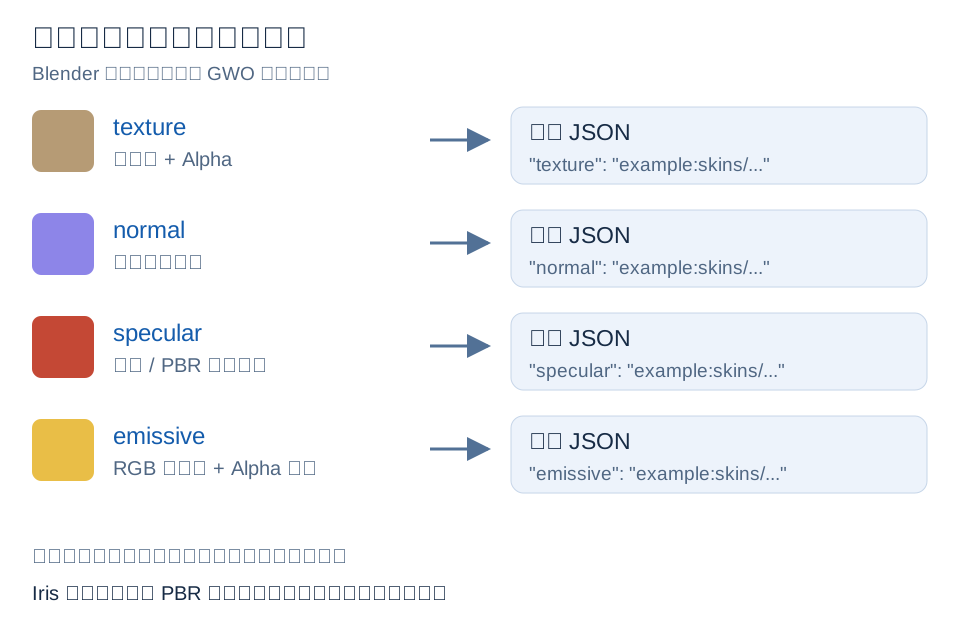
常用字段:
"texture": "example:skins/guns/example_rifle.png",
"normal": "example:skins/guns/example_rifle_n.png",
"specular": "example:skins/guns/example_rifle_s.png",
"emissive": "example:skins/guns/example_rifle_glow.png",
"emissive_strength": 1.0
当前渲染路径的注意事项:
texture:基础色和透明度。normal:切线空间法线贴图。specular:GWO 非光影路径读取红通道作为高光遮罩;启用 Iris 光影后,_n/_s还会按所用光影包的 PBR 约定解释,因此不要假定所有光影包的通道定义完全相同。roughness、metallic可使用独立贴图;没有独立贴图时用roughness_value、metallic_value。emissive:RGB 是发光颜色,Alpha 是发光遮罩;emissive_strength控制强度。
默认部件如果共享枪身图集,也要在自己的渲染 JSON 中明确写 texture、normal 和 specular。不要只写基础色,否则独立渲染的部件可能缺少法线和高光。
透明节点示例:
"transparent_nodes": {
  "lens_glass": {
    "alpha": 0.8,
    "depth_write": false,
    "depth_test": true,
    "double_sided": true
  }
}
玻璃网格必须是真实、独立命名的节点。不要把镜框、镜片和准心合成同一网格后再期待配置能单独控制透明度。
无需持有默认包的教学配置见配置示例与接入步骤。合并示例时保留现有有效字段和显式默认值,不要整段覆盖自己的配置。