Blender Model Rules
Coordinates and bind pose
The muzzle points along model-space +X. Apply mesh rotation and scale, but do not casually apply armature object transforms before export. Receiver, default parts, animation library, and independent arms must share bone names, hierarchy, bind pose, and reference space.
Core nodes and attachment points
| Node | Purpose |
|---|---|
root | Blender Armature object, not a bone |
tag_weapon | Primary first-person weapon/hand reference |
tag_view | First-person view reference |
tag_camera | Camera animation only |
tag_ads | ADS alignment and transition |
tag_align_gun, tag_weapon_focus | Alignment/focus references |
tag_flash | Muzzle flash and tracer origin |
tag_brass | Ejected-case origin |
tag_cosmetic | Charm anchor |
tag_barrel_attach, tag_mag_attach, tag_stock_attach | Default/optional part anchors |
tag_pistolgrip_attach, tag_trigger_attach, tag_guard_attach | Grip, trigger, and guard/pump anchors |
tag_laser_attach | Laser-device model anchor |
tag_laser | Laser beam origin inside the device |
tag_hybrid | Hybrid-optic anchor |
Required first-person hierarchy
For Blender skinning, root is the Armature object containing the root bone, not an extra parent bone. Bone parenting begins inside that object, from tag_view downward. The Empty route uses Empty objects and the Bedrock route uses groups; these are not Blender Armature objects.
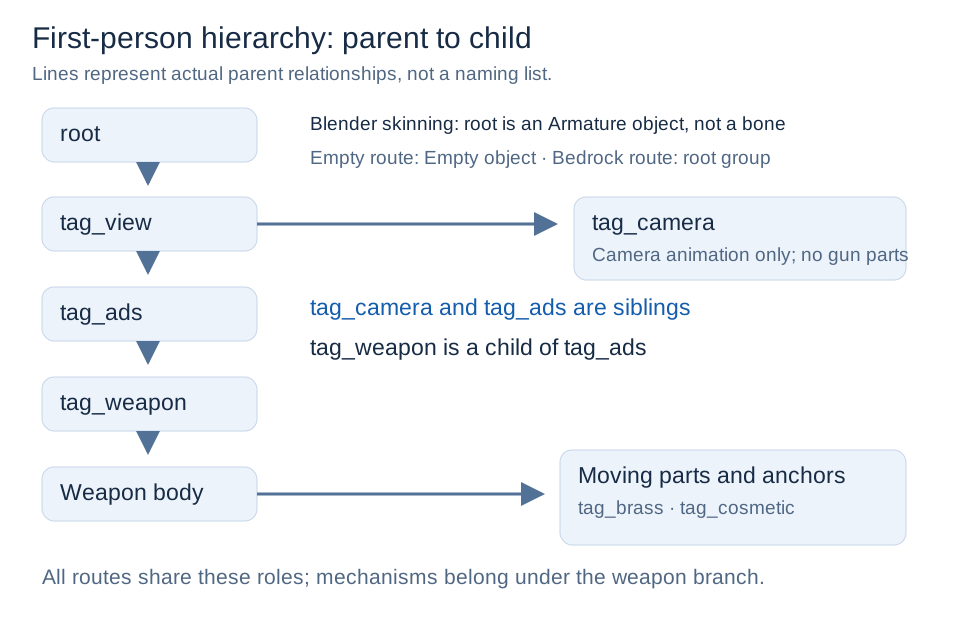
root (Armature object, not a bone)
└─ tag_view
   ├─ tag_camera
   └─ tag_ads
      └─ tag_weapon
         └─ main weapon bone (for example, j_gunx or j_gun)
            ├─ weapon meshes and moving mechanisms
            ├─ tag_align_gun
            ├─ tag_weapon_focus (when needed)
            └─ tag_brass
Every indentation level is a real parent-child relationship. tag_camera and tag_ads are siblings, while tag_weapon is a child of tag_ads. Weapon-specific intermediate bones such as tag_sling or tag_pistol_offset may remain below the main weapon bone, but the core root → tag_view → tag_ads → tag_weapon chain must not be reversed.
For modular weapons, tag_flash normally lives in the barrel GLB below its tag_barrel_attach branch. For a one-piece weapon, it belongs below the moving weapon branch. Muzzle, ejection, attachment, and moving mesh nodes must not be parented directly to root, tag_view, or tag_camera.
Never substitute tag_camera for tag_view.
Default parts
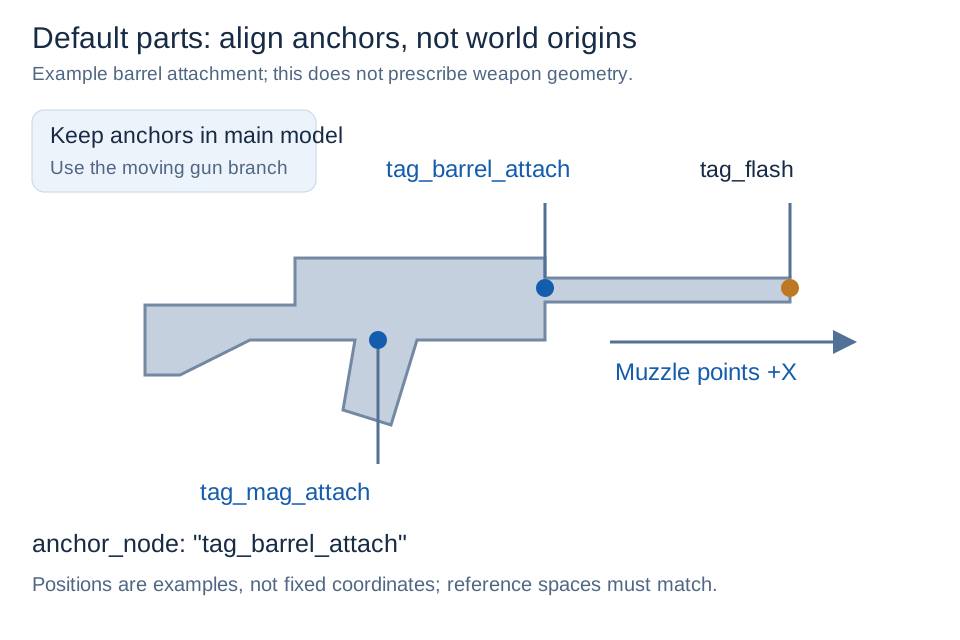
{
  "model": "example:gltf/guns/example_rifle/example_rifle_barrel_default.glb",
  "texture": "example:skins/guns/example_rifle.png",
  "normal": "example:skins/guns/example_rifle_n.png",
  "specular": "example:skins/guns/example_rifle_s.png",
  "icon_texture": "example:textures/item/attachments/example_rifle_barrel_default.png",
  "anchor_node": "tag_barrel_attach"
}
For reversed, offset, incorrectly scaled, or non-animated parts, check the shared reference space, exact anchor spelling, node ownership in the animated rig, extra root transforms, and multi-armature export ownership.
Empty nodes and arm template
Versions with the format update support Blender Empty/spatial animation in no-Skin GLBs, preserving hierarchy, local transforms, and child meshes in the shared pose pipeline. Rigid meshes do not deform; use Armature skinning for deforming arms. Multi-Armature and mixed-rig compatibility are unchanged.
Bedrock entity cubes and numeric animations are also available. See Bedrock and Empty Animation for build requirements, configuration, and limitations.
Download the Arm templates: choose a workflow and download; if you change its skeleton, update the weapon animation library and independent arm model together.
Beginner Blender workflow
- Save a project copy before changing imported data.
- Rename receiver, barrel, magazine, stock, and moving mechanisms in the Outliner.
- Remove unused lights, cameras, duplicate LODs, and imported collision helpers.
- Confirm the muzzle points along
+X. - Apply rotation and scale to mesh objects.
- Preserve the Armature object transform used by the animation project.
- Recalculate accidentally inverted normals; do not force the entire weapon double-sided.
- Separate transparent glass, emissive areas, and independently hidden parts into named meshes.
- Create and inspect the required reference nodes and parents.
- Use one-bone full weight or a stable rigid-node parent for rigid parts.
For File → Export → glTF 2.0, select glTF Binary (.glb), export only required objects, retain mesh/Armature/skinning and intended Empty nodes, and keep the action library out of the model GLB.
Reimport the result into an empty Blender file and verify direction, scale, node names, hierarchy, material slots, transparent mesh separation, and rigid weights. If bone names, hierarchy, bind pose, Armature object transform, or shared arm reference bones change, re-export the model, animation library, and affected arm model together.