Attachments, Optics, and Charms
Attachments
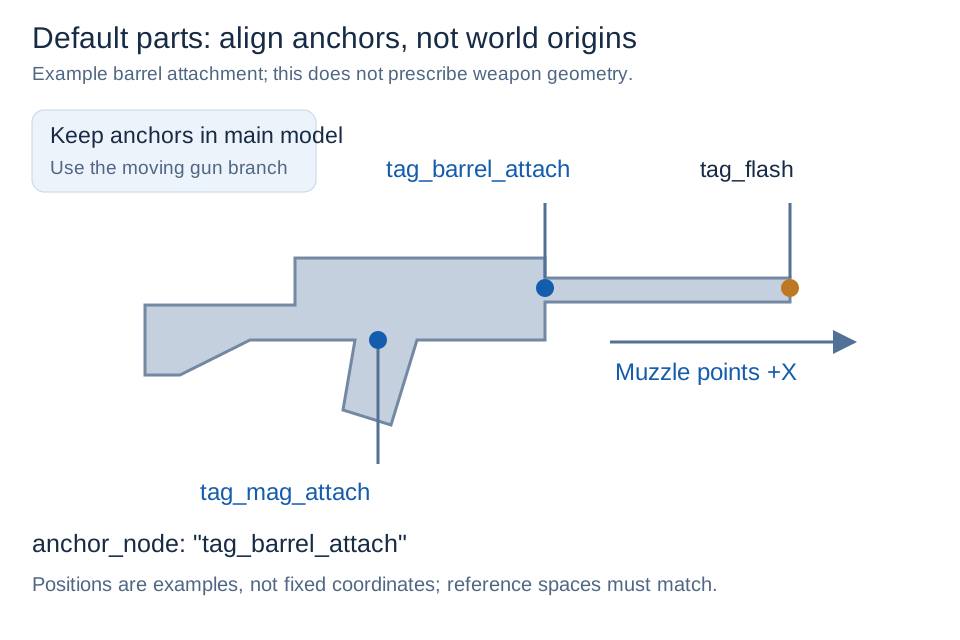
Each attachment has behavior and render definitions. The render file binds its model and maps to an anchor_node; the behavior file declares compatible weapons/slots and stat modifiers. Use the real animated attachment point from the receiver rig.
Nested points must follow the installed part that owns them. For example, a pistol optic attached to tag_reflex on an animated barrel must resolve that node through the barrel's current animated transform.
Laser zeroing and sway
Merge these fields into the existing laser object, preserving color and other settings:
"laser": {
  "zero_distance": 25.0,
  "zero_reference_node": "tag_flash",
  "zero_reference_axis": "+x"
}zero_distance: 0–256 blocks, default 25. Zero disables calibration and preserves the authoredforward_axis.zero_reference_node: muzzle reference, defaulttag_flash; installed modules are searched before the weapon model.zero_reference_axis: reference-local forward axis, default+x; other signed axes are supported.
Calibration uses bind-pose geometry, installed attachment transforms, and gltf_scale. The local direction is cached with the render plan and rebuilt after attachment changes or configuration reload. A missing reference or invalid transform preserves the authored direction. Use zero_distance inside laser, not the internal state name laser_zero_distance at an arbitrary top level.
The beam still follows current weapon sway, recoil, and animation; it does not snap to the screen crosshair. Calibration only changes a small fixed angle, so a 25-block setting may look nearly unchanged. Mounting offset remains visible nearby. This is geometric barrel-axis zeroing, not ballistic zeroing: it does not compensate for spread or gravity or alter server firing direction. First-person display scaling and FOV also affect apparent distance; 25 blocks is an initial tuning value, not a measured guarantee of impact alignment.
Collision results are tick-cached. Movement over 0.025 blocks, a direction change over roughly one degree, or a changed range triggers an earlier refresh. Each laser queries at most once per render frame, shared by ordinary and in-scope passes. Small changes may still retain an approximate distance briefly. No extra world-render pass is added; measure actual performance in your own scene.
Test nearby and approximately 25-block surfaces, wall-edge sweeps, reload/fire animations, and magnified optics with and without shaders. Use /gwo reload for configuration changes; changed models or textures also require a resource reload.
Visibility rules
Use explicit show/hide nodes for iron sights, laser mounts, bipods, alternate magazines, and similar conditional geometry. Verify the exact bone name and intended condition. A hidden node's descendants are hidden as well, so avoid placing unrelated parts beneath it.
Attachment-specific animation
Alternative magazines or moving guards may select replacement actions such as reload_xmaglrg. Their duration and event frames belong to that animation set and must not reuse incompatible default timing.
Keep magazine families separate: xmaglrg is a large extended box magazine and uses *_xmaglrg states; drummag is a drum magazine and uses independent *_drummag states. When both exist, animation_override must route normal/empty, hip/ADS, inspect, empty-additive, and ammunition-additive actions to the matching family rather than changing only the model and capacity.
Optics
A projected reticle normally declares lens and reticle nodes, texture, scale, parallax, stabilization, response, emissive/glow strength, and ADS threshold. Keep the physical glass mesh and runtime reticle separate.
Magnified optics use the single world render plus a lens stencil/mask while retaining GWO's physical lens mesh, reticle, eye relief, and in-scope laser. Verify no weapon/iron-sight ghost silhouette leaks into the scope.
Physical glass opacity belongs in the render definition's transparent_nodes. Only real lens nodes such as scope_front_lens and scope_rear_lens use alpha as glass opacity; lower values generally reduce opacity. This is a multiplier, not final pixel opacity: 1.0 leaves this factor unchanged, while texture alpha and other rendering factors still apply. scope_stencil, scope_relief, and scope_reflection are optical helper geometry rather than ordinary glass. Control the reflection overlay with scope_reflection_alpha. After changing compiled render materials, use F3+T or restart the client; /gwo reload alone does not rebuild GPU material caches.
Hybrid optics declare both modes and a programmatic transition. The magnified image must appear only when the physical magnifier reaches the configured transition point; closing follows the inverse handoff. Variable magnification should expose discrete supported levels and preserve reticle shape/scale.
Magnified reticle parallax
Merge into the magnified optic render definition's sight object:
"sight": {
  "parallax_strength": 0.15,
  "reticle_virtual_depth": 1.0
}
Magnified optics default to a strength of 0.15 when unspecified. Zero preserves the original node projection; one fully uses the virtual-depth projection. The magnified runtime clamps strength to 0–1. reticle_virtual_depth defaults to 1, accepts 0.01–64, and is a virtual-depth coefficient rather than a distance in blocks. Ordinary reflex/holographic optics retain their existing behavior and defaults.
Hybrid and variable-magnification modes may override these optical fields and otherwise inherit shared settings. Projection uses the current node pose and existing lens stencil, independently of eye-box shadow displacement, with no previous-frame smoothing cache. Check centered alignment and relative reticle/lens motion during sway, reload, and fire.
The eye-box shadow position uses the rear lens while obstruction strength still considers both lenses, avoiding position flips when their contributions cross. Do not move the reticle to repair the shadow. After making changes, check the shadow, parallax, and laser zeroing with each intended optic and shader configuration.
Programmatic tactical stance
Tactical stance belongs in the firearm render definition rather than an optic animation:
"canted_aim": {
  "enabled": true,
  "pose_node": "tag_ads",
  "pivot_node": "tag_weapon",
  "translation": {
    "x": 0.0,
    "y": 0.0,
    "z": 0.0
  },
  "rotation": {
    "x": -55.0,
    "y": 0.0,
    "z": 0.0
  },
  "response": 22.0,
  "damping": 0.62,
  "fov_multiplier": 1.0
}
The player holds ADS and presses V to toggle normal ADS/tactical stance for that weapon identity. Magnified and hybrid optics disable the toggle; iron sights, reflex sights, and holographic sights may use it. No laser attachment is required. A temporary first-person canted laser is scoped to one stance session: manually turning it off during that session is respected instead of being forced on again on the next frame. pose_node and pivot_node must exist in the weapon GLB. Rotation/translation define the target pose, response/damping shape the transition, and a fov_multiplier of 1.0 releases optic magnification. Do not bind legacy canted or NVG ADS clips to this route.
Charms
Charms attach to tag_cosmetic. A physics charm needs a stable pivot, content-defined colliders, damping, and motion limits; it must not infer arbitrary weapon collision from render bounds. Dynamic avatar charms may asynchronously fetch a player's current skin and render a runtime nameplate, while their chain continues to use authored PBR textures.
Configuration examples
These examples use the same fields as the Chinese reference. Replace resource IDs, timings, and model-specific nodes with your own. json blocks are JSON objects; jsonc blocks are fragments to merge, not standalone pack files. Valid JSON alone does not make a complete working weapon.
Magazine behavior definition
{
  "id": "example:example_extended_mag",
  "type": "magazine",
  "slot": "magazine",
  "display_name": "Example Extended Magazine",
  "display_name_en": "Example Extended Magazine",
  "default_installed": false,
  "parent_types": ["gun"],
  "properties": {
    "set": {
      "capacity": 60
    }
  },
  "render": "attachments/render/magazines/example_extended_mag.render.json"
}
Nested laser behavior definition
{
  "id": "example:red_laser",
  "type": "laser",
  "slot": "laser",
  "default_installed": false,
  "parent_types": ["barrel"],
  "parent_slots": ["barrel"],
  "laser": {"color": "#ff0000"},
  "render": "attachments/render/lasers/red_laser.render.json"
}
Nested laser render definition
{
  "model": "example:gltf/attachments/red_laser.glb",
  "texture": "example:skins/attachments/red_laser.png",
  "normal": "example:skins/attachments/red_laser_n.png",
  "specular": "example:skins/attachments/red_laser_s.png",
  "icon_texture": "example:textures/item/attachments/red_laser.png",
  "anchor_node": "tag_laser_attach"
}
Weapon bone visibility (merge into render definition)
"gun_bone_visibility": {
  "when_slot_empty": {
    "sight": {
      "show": ["tag_sight_on"],
      "hide": ["tag_sight_off"]
    }
  },
  "when_slot_occupied": {
    "sight": {
      "show": ["tag_sight_off"],
      "hide": ["tag_sight_on"]
    }
  }
}
Reflex behavior sight settings
"sight": {
  "enabled": true,
  "type": "reflex",
  "scope_rate": 1.0
}
Reflex render sight settings
"sight": {
  "reticle_node": "tag_reticle_attach",
  "reticle_plane_node": "tag_lense",
  "rear_lens_node": "rear_lens",
  "lens_node": "lens_glass_ads",
  "projected_reticle": true,
  "reticle_texture": "example:textures/sights/red_dot.png",
  "reticle_emissive_strength": 1.5,
  "reticle_scale": 1.0,
  "reticle_virtual_depth": 1.0
}
Magnified behavior sight settings
"sight": {
  "enabled": true,
  "type": "scope",
  "scope_rate": 4.0,
  "ads_z_compensation": 1.0
}
Integration checklist
Every selectable attachment must be listed in the weapon's modules. Default parts also need default_installed: true. Properties use supported set, add, and multiply keys; a plausible name is not proof that a stat exists.
The installation anchor and the laser's internal tag_laser emitter are different. Use the actual animated parent anchor, not a guessed similar name.
For attachment-specific animations, check clip mappings, controller channels, event categories, ADS pairs, timed commands, reload phases, and mechanical commits. Keep xmaglrg and drummag as separate families where the weapon has both.
For a full fixed scope and a physics charm starting configuration, use Configuration Examples. Hybrid optics must declare separate mode nodes, reticles, and magnification; a global FOV change is not a complete hybrid implementation. Variable optics should share one model, not duplicate a model for every magnification.
An avatar charm's head and nameplate must not receive the chain material. Its configured player name/UUID and geometry names must be your own; do not depend on a particular supporter example from another pack.
For independent teaching configurations without default-pack assets, see Configuration Examples. Existing valid fields and explicit defaults should be preserved when merging examples.
Dynamic rangefinder screens
Development builds can display range on the active first-person optic's model screen. Raptor-FVM40 is fixed at 8x and does not define sight.optic switching modes. Configure these fields under the attachment render definition's states:
{
  "rangefinder_screen_node": "rangefinder_screen_stencil",
  "rangefinder_screen_right": "+z",
  "rangefinder_screen_down": "-y",
  "rangefinder_max_distance": 320
}
The right/down axes are in GLB model space and require a planar screen mesh. Measurements update about 10 times per second while holding the weapon, including on the physical screen outside ADS, displaying one block as one metre. The nearest block, fluid surface, or pickable entity wins. Sky, out-of-range targets, and unavailable terrain produce ---- m. Text follows the optic with normal depth testing; third-person synchronization is not included.
While aiming through a rangefinder optic, press V (the existing weapon-alt key) to lock a valid distance; L marks the locked reading. Press V again while aiming to resume live ranging. Invalid readings cannot be locked. Lowering the sight retains the lock. Outside ADS, the key retains its existing melee action.
Red distance digits appear at the upper left inside the scope and on the physical screen, sharing one reading. While aiming, V locks a valid range and adds L to both displays; V again resumes live ranging. Invalid readings show ---- m and cannot be locked. Lowering ADS retains the lock; changing weapons or sights clears it. The scope remains fixed at 8x with its original reticle. Ballistic prediction and the separate holdover marker are not included.
rangefinder_screen_stencil supplies the text plane position, orientation and dimensions; rangefinder_screen_background is the physical backplate. Configure the text plane in transparent_nodes with alpha: 0 and depth_write: false to exclude its mesh from opaque and transparent drawing while retaining its geometry for text placement. Red full-bright text uses normal occlusion and no extra black rectangle.
Range is the straight-line eye-to-surface distance along the player's view, rounded to an integer. Entities use their bounding-box surface. The default maximum is 320 metres, configurable from 1 to 1024, without loading chunks. In-scope digits are clipped to the lens. Shader appearance and visual reticle alignment still require in-game acceptance testing.
For field purpose, units, defaults and adjustment effects, see the parameter reference. For animation control/blending, see Lua animation machines.